Kompas-MCP connects an AI agent to an installed KOMPAS: the agent creates parts, sketches, assemblies and drawings, while the server reads the model back and reports what actually happened — not merely that «the call went through».
Windows x64 — version 1.3.6 · KOMPAS-3D v25 · 57 tools
WHY KOMPAS-MCP
Not a script for one task, but tools the agent understands itself
A pywin32 script does only what was written into it and stays silent when something goes wrong. An MCP server describes every action to the agent with a schema, puts KOMPAS into a known state and checks the model after each operation. The agent does not guess the API — it calls a tool and gets a measured result.
57
tools with a JSON schema: from sketches and extrusions to assemblies, drawings and STEP
the list comes from kompas_capabilities
54,214
KOMPAS API entry points available to the agent through the kompas_call gateway
API5 + API7, measured with a probe
4
levels of result verification — from «call returned» to «geometry matches»
unverified_aspects lists what was not checked
1
installer: server, Worker, GUI and .NET inside
one file, no .NET to install
The agent sees what the server can do
Each of the 57 tools reaches the agent with a strict JSON schema: name, parameters, types, description. A bad argument is rejected as invalid_argument before KOMPAS is touched. With a script, the agent has to read the source and guess how to call it.
The answer is read back from the model
KOMPAS return codes are unreliable: a measurement on v25 showed a cut that created a feature, returned Create() = true and removed not a single millimetre of material. The server replies operation_had_no_effect with the volume before and after — not ok.
Verification level — call_returned, read_back, geometry_checked; the server claims nothing beyond what was checked.
The measure is volume. Overall size does not change for an internal cut, and the v25 object counter returns zero — volume detects both added and removed material.
Numbers match analytics: an edge fillet removes 77.256661176918 mm³ against a calculated 77.2566611769186.
The same on a large model. While building V6, a sweep with the arc the wrong way returned operation_had_no_effect, not ok; the agent flipped the arc and the next call built the pipe.
Errors carry a cause and a next step
A script dies with a COM traceback. The server replies with a code and a retry policy: stale_reference — the edge reference is outdated, re-read topology; revision_conflict — the model changed since it was read; outcome_unknown — a timeout, retrying blindly may apply the operation twice; path_not_allowed — a path outside the allowed directory. Alongside it goes retry_policy: safe_to_retry, retry_after_reread, do_not_retry_blindly.
A retry will not spoil the model
Every mutation carries an operation_id and is written to a journal before and after execution. A retry with the same operation_id is not applied twice; expected_revision rejects edits to a stale model. In a script you write this by hand — or you don't.
A hung call does not kill the session
KOMPAS COM lives in a separate Worker process: one STA thread with a command queue. STEP exports and assembly rebuilds take minutes and cannot be cancelled; a hung Worker is restarted while the agent keeps the connection and learns which documents became invalid. A script has to be killed together with its console.
Without the fragility of pywin32
KOMPAS exposes part of its features through secondary interfaces and out-parameters. In Python this breaks quietly: late binding does not see ViewProjectionManager until the object is cast to IKompasDocument3D1; some methods are invisible to late binding; makepy is not generated for KOMPAS. The server is written in C# against the interop assemblies: a wrong member name is caught at compile time, not at the user's machine.
Other people's files stay safe
Directories have roles: where the agent reads models, where it writes its own, where it exports STEP, STL, DXF and snapshots. Once a root is set, a path outside it is rejected with path_not_allowed before KOMPAS is called; the write root cannot equal the read root. The server never closes the user's KOMPAS, and takes manually opened documents only by explicit adopt.
Works with any MCP client
The same server connects to any MCP-capable client: by command (stdio) or at http://localhost:8770/mcp while the GUI is running. A script is tied to whoever wrote it and to the machine it sits on.
Capability
Kompas-MCP
Python script
Actions described for the agent (JSON schema)
✓
—
Result verified by reading the model back
✓
partly
«No effect» instead of a false success
✓
—
Error codes with a retry policy
✓
—
Protection against retries and stale state
✓
—
Recovery from a hung COM call
✓
—
Write and export path restrictions
✓
partly
One-file install, no Python or .NET
✓
—
Access to any API member
✓ via kompas_call
✓
«Partly» — verification and path restrictions can be written into a script by hand; in Kompas-MCP they are built into every tool. Access to the long tail of the API exists in both cases: unlimited in a script, and through a gateway with a journal, revisions and forbidden destructive routes in the server.
WHAT THE SERVER DOES
57 tools. Every one confirms its result.
Parts from scratch
Sketch, extrude, revolve, loft, sweep, shell, mirror, circular pattern — every feature is confirmed by volume.
Fillets and chamfers
Edges are addressed by a topology reference, not by ordinal number; removed material is checked against analytics.
Editing existing models
The server sees documents opened manually, adopts them and edits sketches, planes and features.
Assemblies
Components from files, rotation and repositioning, plane mates — positions are proven by reading back.
Drawings
Standard views, linear, diameter and angular dimensions, title block and notes; export to DXF and raster.
Export and snapshots
STEP, STL, model images from any angle — 13 orientations with a configurable up-vector.
SDK reference built in
Search the offline help shipped with KOMPAS: the agent reads a signature instead of recalling it.
LIVE RUN SNAPSHOTS · V1.3.5
The agent looks at the model itself and shows what it built
Front · frontset_model_view(orientation="front")Right · rightset_model_view(orientation="right")Another angle · iso_yset_model_view(orientation="iso_y")
KOMPAS_PATTERN_CIRCULAR
One hole → six, in a single call
Before · source featureextrude(feature_kind="cut") # Ø8 on R33After · circular patternpattern_circular(axis="z", count=6, step=60)
volume 76,843.4 → 74,330.1 mm³ · −5 × 502.65 mm³ · verification: geometry_checked (five copies of the Ø8 hole)
KOMPAS_ADD_COMPONENT
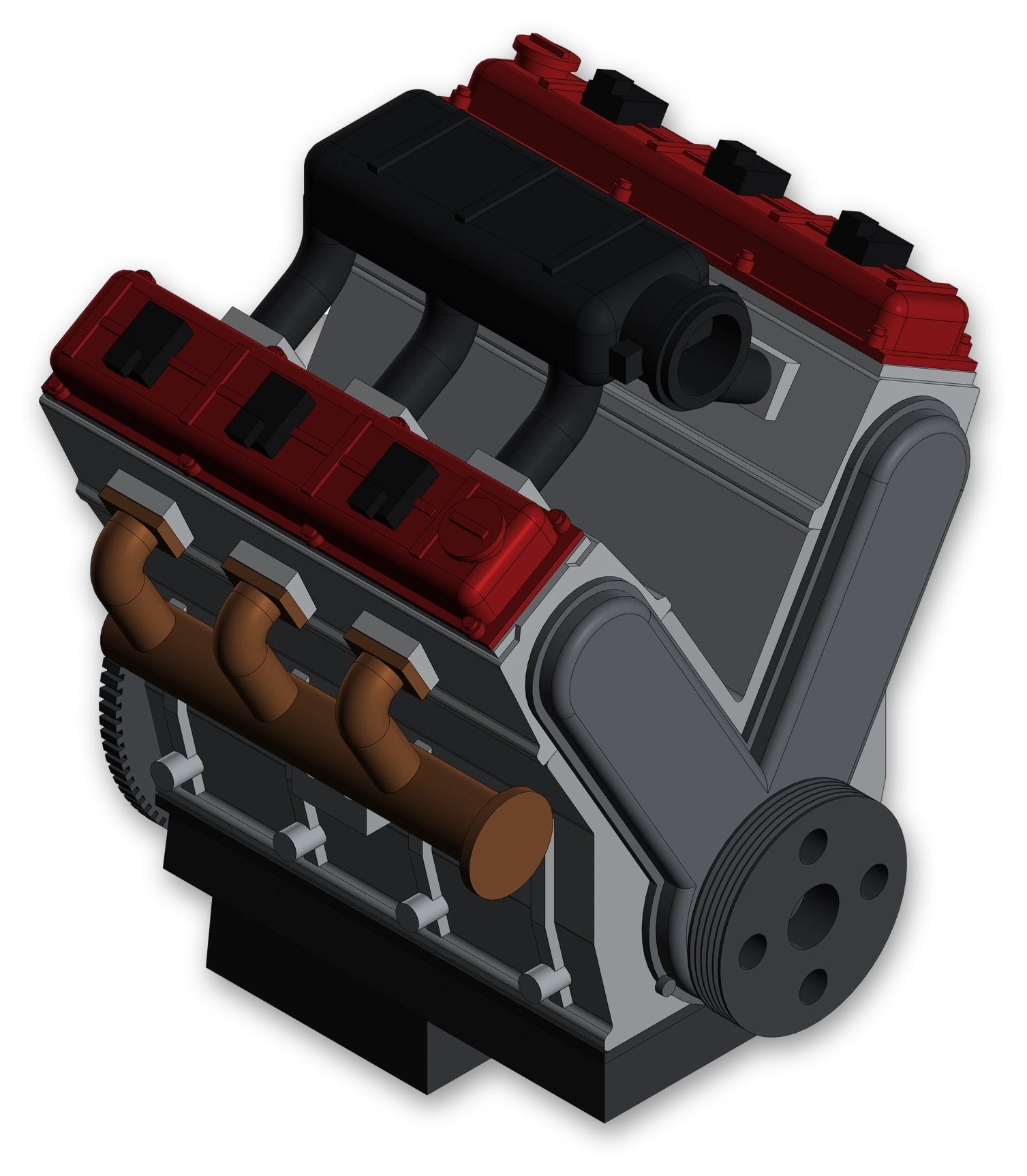
A 37-component assembly — also the agent
37
components in an assembly of 14 parts
pistons, conrods, coils and runners — six copies of one file each
150.0
mm — the length of each of the six conrods
positions are computed from the crankshaft angle
803
MCP calls for the first version, ~15 min
another 817 for a realistic body and colours, ~23 min
1
cut KOMPAS called a success, but the server did not
operation_had_no_effect: «Create() returned True, but the body volume did not change»
V6 engine · iso_yBlock, heads, intake, exhaust, crankshaft — 37 components, all built by the agent.Head removedOne bank is open: cylinder 1's piston sits at top dead centre.
V6 frontset_model_view(orientation="iso_z")Bent runners made by sweeping; colours come from materials stored in the part files.60° V angleset_model_view(orientation="left")Two banks at ±30°, exhaust manifolds on the sides, plenum in the V.InsideThree crankpins 120° apart, two conrods on each. Every conrod is exactly 150 mm long.
Live run v1.3.5, KOMPAS-3D v25. Colour snapshots were taken through COM: kompas_export_image in 1.3.5 exports greyscale rasters.
GUI HOST AND INSTALLER
One window instead of guesswork
ServerStatus and URL for the agent, connected agents, tool call journal, example prompts and output directories — in one window.InstallationThe wizard finds KOMPAS, installs the server into the chosen directory, verifies it and creates a desktop shortcut.
CONNECTING AN AGENT
Connect an agent — one line in the config
Start Kompas-MCP from the desktop shortcut and copy the URL with the «Copy URL» button. The server runs while the window is open.